Global Filters
A global filter is a mechanism that passes the same parameter value to all widgets on a board. When global variables in Compass queries are bound to a Horizon board, all charts can be re-run with the same value from a single control point in the board's top panel. The most common uses: date range selection, shift selection, plant/line filter.
Prerequisite
The relevant queries on the Compass side must use a global variable in :global_var_name form. If no such definition exists in Compass, the global filter panel comes up empty.
1. Global Variable Definition (Compass)
A parameter definition in a Compass query looks like:
SELECT
    hour,
    SUM(production_count) AS count
FROM production_log
WHERE
    hour BETWEEN :start AND :end
    AND plant_id = :plant
GROUP BY hour
ORDER BY hour
Here :start, :end, and :plant are global variables. On the Compass side, type (text/number/date), default, and list values are defined per variable.
→ For global variable usage in Compass: Compass
2. Board Toolbar — Global Filter Button
The Horizon board top bar has a Global Filter button (with a "GF" badge). Clicking it opens the Global Filter Panel above the canvas.
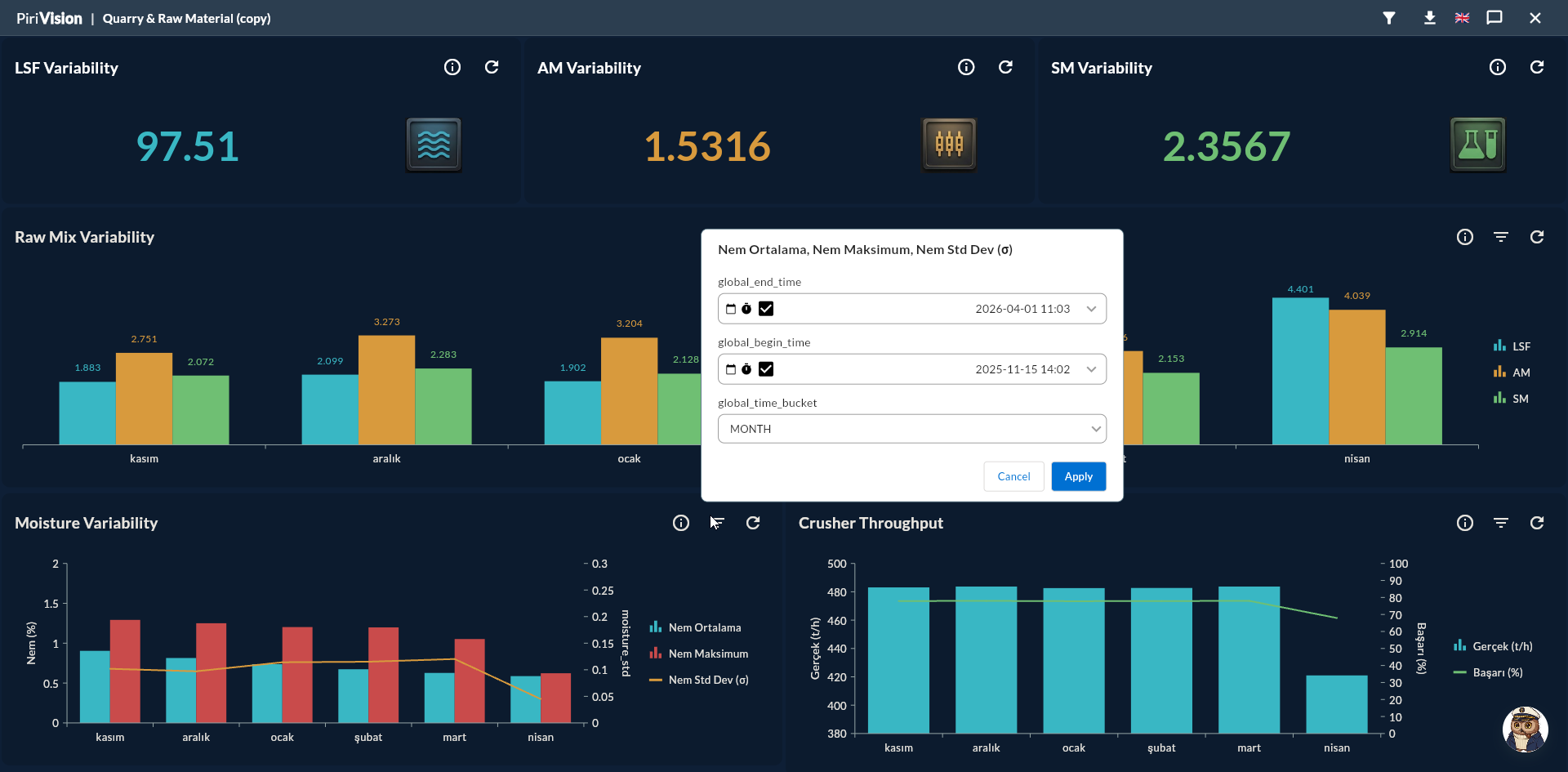
3. Global Filter Panel Contents
The panel shows the union of variables across all widgets used on the board. That is:
- If widget A's query has
:start,:end - If widget B's query has
:start,:plant - The panel shows 3 fields:
:start+:end+:plant
| Field Type | Visual |
|---|---|
| Date / DateTime | Date picker |
| Number | Numeric input |
| Text | Text input |
| List | Dropdown (options defined in Compass) |
4. Applying the Filter
Fill in one or more fields and click Apply.
| Behavior |
|---|
| All widgets are re-queried with the new values |
| Widgets that do not use a particular variable are unaffected |
| If a default is set, leaving the field empty falls back to the default |
| The Reset button restores all values to defaults |
5. Default Values
A default is defined for each global variable in Compass. When the board first opens, this default value is used. If no default is defined, the widget does not fetch data and shows a "Missing parameter:
Date Defaults
For date range parameters, define dynamic defaults like now() - interval '24 hours' in Compass. The board will show the last 24 hours of data on every open.
6. Filter Persistence
| Behavior | Result |
|---|---|
| Change filter and Apply | Valid only in this session |
| Refresh page (F5) | Reverts to defaults |
| Last filter values are not persisted when the board is saved | — |
Work With Defaults
The cleanest approach is to define commonly-used value ranges as defaults in Compass; you don't have to enter them manually each time.
7. Conflicting Type Definitions
When the same global variable is defined with different types in two widgets (e.g. :date is date in one widget and text in another), the panel shows a single field for the first type it sees. This typically stems from inconsistent query authoring in Compass.
Consistent Naming
Use a global variable with the same name and same type across all queries. Use :start in both Plant1 and Plant2, not :start in one and :start_date in the other.
8. Common Errors
| Symptom | Possible Cause | Solution |
|---|---|---|
| Panel is empty | No widget uses a global variable | Add :variable to queries in Compass |
| "Missing parameter" error | No default defined and no value entered | Set a default in Compass or enter a value in the panel |
| Apply does not work | Two different types under the same name | Standardize the Compass definitions |