CaptainAI #Extension
CaptainAI (codebase: KaptanAi, Turkish UI: Kaptan AI) is an assistant module that sends the live view and widget data of a Horizon board to the Langflow API to enable natural language chat. Operator questions (e.g. "what caused the downtime in shift 2?", "which parameter exceeded the threshold in the last 24 hours?") can be asked directly from within the board.
Backend Dependency
CaptainAI requires the pirivision-langflow-api service (port 7870) to be running. If the service is unreachable, the chat will not start or responses will be empty.
Horizon Only
CaptainAI is available only on Horizon board screens; it is not present on Atlas dashboards. For Atlas boards, other mechanisms such as XLSX/PNG export and embed are used.
1. Captain Button
A floating round button with a captain icon appears in the bottom-right corner of the Horizon board. Clicking it opens the CaptainAI chat dialog.
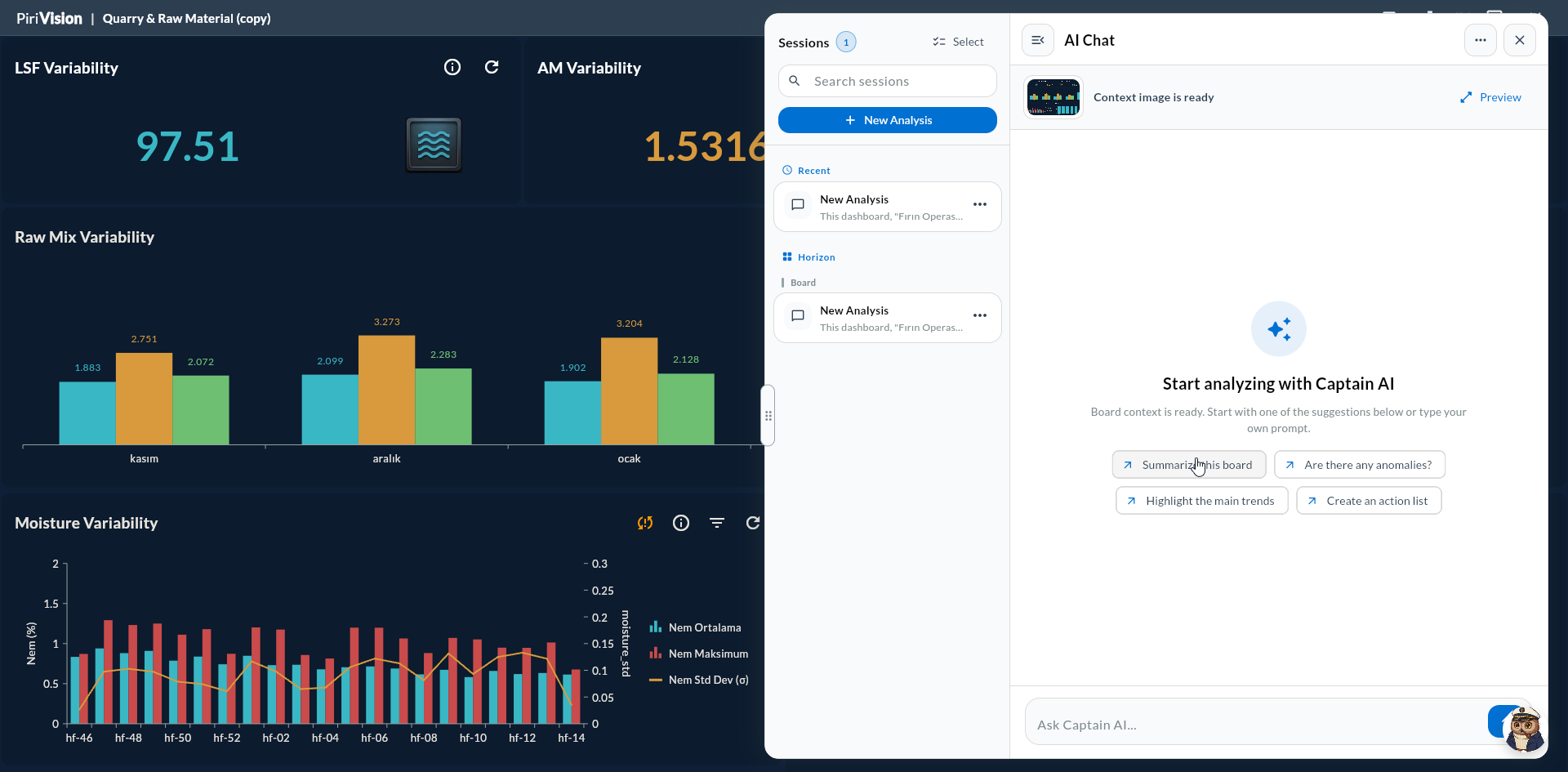
The dialog opens as a resizable and draggable overlay:
| Interaction | Behavior |
|---|---|
| Drag handle | Moves the dialog horizontally |
| Resize handle | Adjusts width between minWidth ↔ maxWidth |
| Snap min/max | Snaps to the narrowest or widest size with one click |
| Close button | Hides the dialog; session history is preserved |
2. Chat Dialog
The dialog consists of the following sections:
| Section | Description |
|---|---|
| Sidebar | List of previous sessions (by date); start a new session |
| Message history | Messages of the active session (Markdown + LaTeX rendered) |
| Context image | Latest board snapshot (stable for the duration of the session) |
| Input area | Text box where you type your question |
| Send / Stop | Sends a message or cancels a pending request |
The sidebar can be opened and closed; it remains always visible on wide screens and can be hidden on narrow screens.
3. What Happens When a Message Is Sent?
When you press Send, CaptainAI sends the following package to the Langflow API:
| Package Component | Description |
|---|---|
| Question text | The message you typed |
| Board PNG snapshot | Board image captured via RepaintBoundary + toImage(), base64 encoded |
| Board XLSX | Data produced by all widgets through the KpiExportable interface, converted to XLSX with syncfusion_flutter_xlsio, base64 encoded |
| Session ID | For Captain session persistence |
| Board ID | boardId and currentBoardId (which board did the history image belong to?) |
flowchart LR
    A[User question] --> B[Take board snapshot]
    A --> C[Generate XLSX from widgets]
    B --> D[Langflow API]
    C --> D
    A --> D
    D --> E[Response]
    E --> F[Display in chat dialog]
4. XLSX Export Detail
Before sending a message, CaptainAI collects data from each widget. The widget must implement the KpiExportable interface; most Cartography chart types support this.
| Widget Type | Added to XLSX? |
|---|---|
| Cartesian (Line, Area, Column, Bar, etc.) | ✓ |
| Circular (Pie, Doughnut, Radial Bar) | ✓ |
| DataGrid (Table) | ✓ (all rows) |
| Two-Column List | ✓ |
| Gauge | ✓ (single value) |
| Dynamic Text | ✓ (single value) |
| Static Text | ✗ (no data) |
XLSX filename: Board_<BoardName>_<yyyyMMdd_HHmmss>.xlsx
5. Session Persistence
A separate KaptanSessionItem is maintained for each board. When you close and reopen the dialog, the last chat history is loaded. If the browser session is cleared, the history is lost.
| Feature | Behavior |
|---|---|
| New Session | Started from the sidebar; message history is reset |
| Return to Session | By clicking the session card in the sidebar |
| History Image | Board snapshot sent in an older session appears as a small preview in the sidebar |
| Stable Context | The snapshot reference remains stable across messages in the active session (not re-rendered per message) |
6. Response Rendering
CaptainAI responses are rendered as Markdown + LaTeX (flutter_markdown_latex package):
| Format | Rendered As |
|---|---|
**bold**, _italic_ |
Standard Markdown |
# H1, ## H2 |
Headings |
```sql ... ``` |
Code block (with copy button) |
$x = a + b$ |
LaTeX inline math |
Table (\| col \|) |
HTML table |
7. Tips for Writing Good Questions
| Question Type | Example |
|---|---|
| Trend analysis | "Why did production count drop in the last 4 hours?" |
| Anomaly detect | "Which parameter had a peak value in the last 24 hours?" |
| Comparison | "Compare OEE values for Line 1 and Line 3" |
| Summary report | "Prepare a brief summary for this shift" |
| Visual reference | "Why is there a red alert on the top gauge?" |
Questions That Provide Context
Since Captain sees the board snapshot, you can give references like "this chart" or "the top gauge". It can interpret which widget you are referring to.
8. Limitations
- The chat is limited to a single board; it cannot access data from other boards.
- Response quality depends on the Langflow flow configuration.
- Response time may increase on large boards (10+ widgets); XLSX generation takes time.
- If the service does not respond, the error is handled silently; the message may appear in a continuous "loading" state.
- Not available on Atlas dashboards.
Sensitive Data
CaptainAI sends board data to the Langflow service. Be mindful of which parameters are exported when working with boards that contain sensitive data. If necessary, keep sensitive widgets outside of the board.
9. Troubleshooting
| Symptom | Possible Cause | Solution |
|---|---|---|
| Floating button not visible | Board screen not fully loaded or feature flag is off | Refresh the page, confirm pirivision-langflow-api is running |
Message stays at typing... |
Langflow response is delayed or service error | Cancel with Stop; if the problem persists, contact your system administrator |
| Widget data missing in response | Widget does not implement KpiExportable |
Check the chart type (data-less widgets like Static Text are normal) |
| Snapshot appears corrupted | Board layout changed before RepaintBoundary captured it |
Try again after the page has stabilized |
| Previous sessions are empty | No chat record in DB | Session record is not created until the first message is sent |
10. Next Step
→ Horizon — Export — Download the board as a file → Makinist — Compass SQL Assistant → AI Ecosystem — Overview → Ecosystem